Guide
Phone lost or stolen? The first-hour checklist for SIM, UPI and bank apps, then the CEIR block
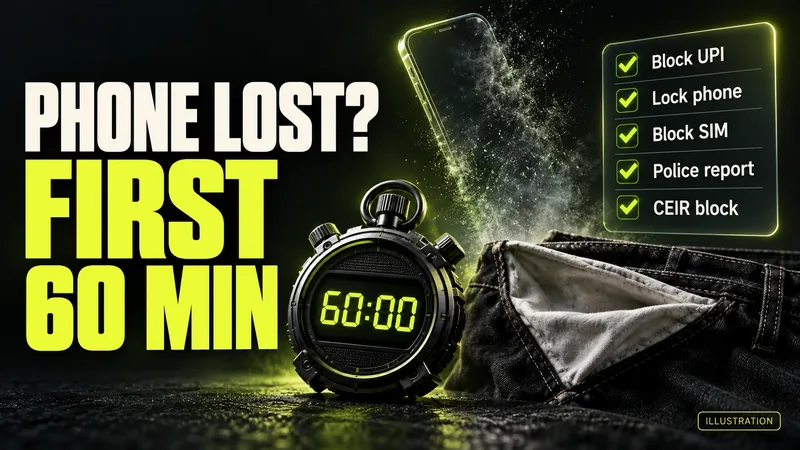
AI-generated editorial illustration by CyberShitty. Not a photograph or a document from the organisations named.
Call your bank first, then lock the phone, block the SIM, change passwords from another device and go to the police. The CEIR block follows about a day later, once your new SIM can get the OTP. The order, the refund rules and the fake 'iPhone found' SMS.
01 / The short answer
Lost your phone, or had it stolen? Protect your money first and the handset second. In the first hour, from another phone: get your bank to block UPI and net banking, lock or erase the phone, block the SIM, change your email and banking passwords, and report the loss to the police.
Block the money before you go looking for the phone.
The CEIR block, which stops the handset working on Indian networks, comes about a day later: it needs a police report and an OTP on a re-issued SIM. Money already gone? Call 1930 now. Section 08 has the steps.
02 / The first hour, in order
Use a family member's phone or a computer. Do not wait for a police report before steps 1 to 4: blocking your bank access, the phone and the SIM comes first. Your operator may ask for a copy of the police complaint before it issues the duplicate SIM.
- Call your bank. Ring every bank whose app or UPI is on the phone, on the number from its official website, your card or our bank helpline list, and ask it to block UPI, net banking and mobile banking. RBI requires banks to offer 24x7 channels for reporting unauthorised transactions and lost or stolen payment instruments such as cards. PhonePe says its customer care or support form can also suspend your PhonePe account. Speed matters: where your UPI app and phone support it, UPI Tap & Pay lets an unlocked phone pay up to ₹5,000 at a card machine that takes NFC (tap-to-pay) payments, without the UPI PIN. Business Standard reported that limit on 10 September 2026, quoting NPCI, as the feature was announced at the Global Fintech Fest; Electronic Payments International reported the same.
- Lock it, or erase it. Android: sign in to Find Hub at android.com/find and choose Mark as lost to lock the phone, or Factory reset to erase it. iPhone: sign in at icloud.com/find, which Apple says needs no verification code, and turn on Lost Mode, or erase it. Erasing cannot be undone. Two warnings. Apple says not to remove the phone from Find My, even after erasing it: that removes Activation Lock and makes the phone 'easier for the thief to unlock and resell'. And Google says Find Hub can secure or erase a phone only while it is signed in to your Google Account, so do this before you sign it out.
- Block the SIM, and ask for a duplicate. Call your operator's official customer care, or visit its own store with ID. Until the SIM is blocked, OTPs for your number can reach whoever holds the phone. Ask for a re-issued SIM for the same number: CEIR needs it. Never take SIM or eSIM 'help' from a caller you did not ring: how eSIM fraud works.
- Change passwords from another device. First the email account on the phone (your Google account or Apple Account), then net banking and other accounts it was signed in to. Once an Android phone is locked or erased, sign it out at google.com/devices, as Google advises for lost devices. Leave an iPhone in Find My, and check your Apple Account for changes you did not make, as Apple advises.
- Report it to the police. Report it at a police station, or online if your state allows it: Delhi Police, for example, has online 'Lost Report' and 'Stolen Report' options. Keep a copy and the complaint number. Note the IMEI, the phone's 15-digit identity number (a dual-SIM phone has two): Find Hub shows it in the device's settings, and Apple lists it at account.apple.com under Devices.
03 / A day later: block the handset on CEIR
The Central Equipment Identity Register (CEIR), on the Department of Telecommunications' Sanchar Saathi portal and app, blocks a phone's IMEI on all Indian networks, even with another SIM inside. The form asks for:
- a copy of the police report or FIR;
- a re-issued SIM for the lost number, for the OTP. Sanchar Saathi says SMS on a re-issued SIM starts 24 hours after activation, under TRAI's rules;
- an identity proof to upload;
- the IMEI, if you have it, and the purchase invoice, which is optional.
Sanchar Saathi says a reported phone is blocked within 24 hours, and that the state police can also request the block. If any SIM is then used in it, an alert goes to you and to the police station where you complained, the government said in September 2025. Keep the request ID: you need it to unblock the phone. The CEIR form, step by step.
Be realistic. When we checked on 1 October 2026, Sanchar Saathi's dashboard showed 60.81 lakh phones blocked, 37.75 lakh traced and 13.98 lakh recovered: fewer than a quarter of blocked phones, by our calculation. The dashboard's own 'recovery percentage' of 37.04% works out as recovered phones as a share of traced phones, not blocked ones. Secure your accounts as if yours will not come back.
04 / Watch your accounts, and report debits fast
Bank SMS alerts go to your number. That number stays on the lost SIM until it is blocked, and a re-issued SIM gets SMS only 24 hours after activation, so you may miss alerts in between. Check your accounts through net banking on another device, and watch your inbox: banks may also send email alerts if you registered an email, under RBI's rules.
How fast you report a debit you did not make decides what you can get back:
- Transactions up to 31 December 2026: under RBI's 2017 rules, you owe nothing for a third-party fraud if you tell your bank within three working days of its alert.
- Transactions from 1 January 2027: the window is five calendar days from the transaction.
- If the loss came from your own negligence, for example sharing a PIN or OTP: under the 2017 rules, you bear it until you report it. From 1 January 2027 the same applies, but RBI adds a one-time compensation for individuals: on a gross loss of up to ₹50,000, 85% of the net loss (after any money recovered) or ₹25,000, whichever is less. The bank must find the loss genuine, and you must report the fraud to your bank and on 1930 or cybercrime.gov.in within five calendar days.
So report the same day, to your bank in writing and on 1930. RBI's new refund rules, explained.
05 / The 'your iPhone has been found' SMS
A second attack can follow the loss. In May 2026 the Indian Cyber Crime Coordination Centre's threat analytics unit (I4C's NCTAU) warned iPhone owners about it, The420 (11 May) and ETV Bharat, carrying an IANS report (23 May), reported. As reported:
- people whose iPhone was recently lost or stolen get an SMS, often from a numeric sender, posing as Apple Support or 'Find My iPhone';
- it says the phone has been located or switched off, and pushes you to a link;
- the link opens a fake Apple or iCloud login page that asks for your Apple ID details and the verification code Apple sends;
- with those, criminals get into your iCloud account, remove the phone from your Apple ID and switch off Find My, so it can be resold.
Apple's own help page says it 'will never contact you to say that your iPhone or iPad has been found'. Do not tap the link. Type icloud.com/find yourself, never share a verification code, and keep the phone in your Find My list. The reports say I4C also advised keeping Find My on and blocking the phone on CEIR. Report the SMS on Chakshu. On Android, likewise, open Find Hub yourself, never through a link.
06 / Before it happens: set these up now
- Check that Find My or Find Hub is on. Without Find My, Apple says, you cannot mark a lost iPhone as lost or erase it remotely.
- iPhone: turn on Stolen Device Protection (iOS 17.3 or later). Apple says it helps stop a thief who knows your passcode from making critical changes when the phone is away from familiar places.
- Android: turn on Remote Lock (Settings, Google, All services, Theft protection), so android.com/lock can lock the phone with just your number while your SIM is still in it.
- Write down your IMEI (dial *#06#) and your bank's fraud number, away from the phone, and lock payment apps with their own PIN, as PhonePe advises.
07 / What we confirmed, and what we could not
Confirmed (official sources): the CEIR requirements, block, alerts and figures (DoT, PIB); how Find My, Find Hub, Remote Lock and Stolen Device Protection work (Apple, Google); the liability rules (RBI); PhonePe's suspension route; Delhi Police's online reports. Reported (media): I4C's May 2026 warning (The420, ETV Bharat/IANS); we did not find the advisory on an official website. The Tap & Pay limit (Business Standard, Electronic Payments International); we read NPCI's 10 September release, but NPCI's site blocks our automated link check, so we link to the reports. Claimed (by scam SMS): that your lost iPhone has been found. Left out: the 'Safety Switch' in BHIM's MyUPI assistant. NPCI BHIM Services says it can block a linked account after a lost phone, CNBC-TV18 reported on 22 September; MediaNama's test the next day found it did not appear to work yet, and we could not test it. Use your bank's helpline. Not available: an official count of frauds that follow phone thefts.
08 / Tricked, or money gone? What to do now
- Money has gone: call 1930 now, then your bank on its official number, then complete the complaint on cybercrime.gov.in. Our lost-money checklist and UPI fraud guide cover the first hour. How to report on 1930 and cybercrime.gov.in.
- Typed your Apple ID or a code into a fake page: from a trusted device, change your Apple Account password and look for changes you did not make, as Apple advises. Check the phone is still in Find My, and report the SMS on Chakshu.
- Shared an OTP or PIN with a caller after the loss: get your bank to block UPI, cards and net banking, and change your PINs. If money leaves later, call 1930 at once.
- Friends got money requests from your number or chats: tell them it is not you, and ask anyone who paid to call 1930.
- Worried someone is using a SIM in your name: check the SIM cards in your name on Sanchar Saathi.
- Bank not helping: complain in writing, keep the complaint number, then go to the RBI Ombudsman. Ignore anyone who offers to 'recover' your money for a fee: what recovery really looks like.
Source log / 2026-1001-LS
- Sanchar Saathi (DoT) — Block your lost/stolen mobile handset: FAQ and State/UT dashboard, accessed 1 Oct 2026 Primary
- CEIR (DoT) — Request for blocking lost/stolen mobile: form and prerequisites, accessed 1 Oct 2026 Primary
- PIB (Ministry of Communications) — Over 6 lakh lost and stolen mobile handsets recovered on DoT's Sanchar Saathi initiative (30 Sep 2025) Primary
- Apple Support — How to find your lost iPhone or iPad (15 Sep 2026) Primary
- Apple Support — Find the serial number or IMEI on your iPhone, iPad or iPod touch Primary
- Apple Support — About Stolen Device Protection for iPhone Primary
- Google Account Help — Find, secure, or erase a lost Android device (Find Hub) Primary
- Android Help — Protect your personal data against theft (Remote Lock) Primary
- Google Account Help — See devices with account access Primary
- RBI — Customer Protection: Limiting Liability of Customers in Unauthorised Electronic Banking Transactions, RBI/2017-18/15 (6 Jul 2017) Primary
- RBI — RBI issues amendment directions on 'Review of Framework of Limiting Customer Liability in Digital Transactions' (24 Jun 2026) Primary
- RBI — Commercial Banks (Responsible Business Conduct) Third Amendment Directions, 2026 (in force 1 Jan 2027) Primary
- PhonePe — Lost your phone? Here's what you need to do to safeguard your savings (4 Jun 2025) Primary
- Delhi Police — Property Theft: Lost Report and Stolen Report, accessed 1 Oct 2026 Primary
- The420.in — I4C (MHA) warns on hybrid cybercrime targeting iPhone users (11 May 2026) Secondary
- ETV Bharat (IANS) — Fraud alert for iPhone users: I4C issues advisory about sophisticated 'hybrid cybercrime' (23 May 2026) Secondary
- Electronic Payments International — India's NPCI rolls out NFC-based UPI Tap & Pay for POS payments (11 Sep 2026) Secondary
- Business Standard — UPI gets new features: Tap-to-pay, unified window for transaction details (10 Sep 2026) Secondary
- CNBC-TV18 — BHIM payments app introduces MyUPI AI assistant for UPI support, mandate management and safety controls (22 Sep 2026) Secondary
- MediaNama — Explainer: What is NPCI's AI-powered MyUPI and what we found while using it (23 Sep 2026) Secondary
- Sanchar Saathi (DoT) — Chakshu: Report suspected fraud communication Primary
- National Cyber Crime Reporting Portal Primary